How Plan7Architect Pro Helps Homeowners Create Buildable Floor Plans

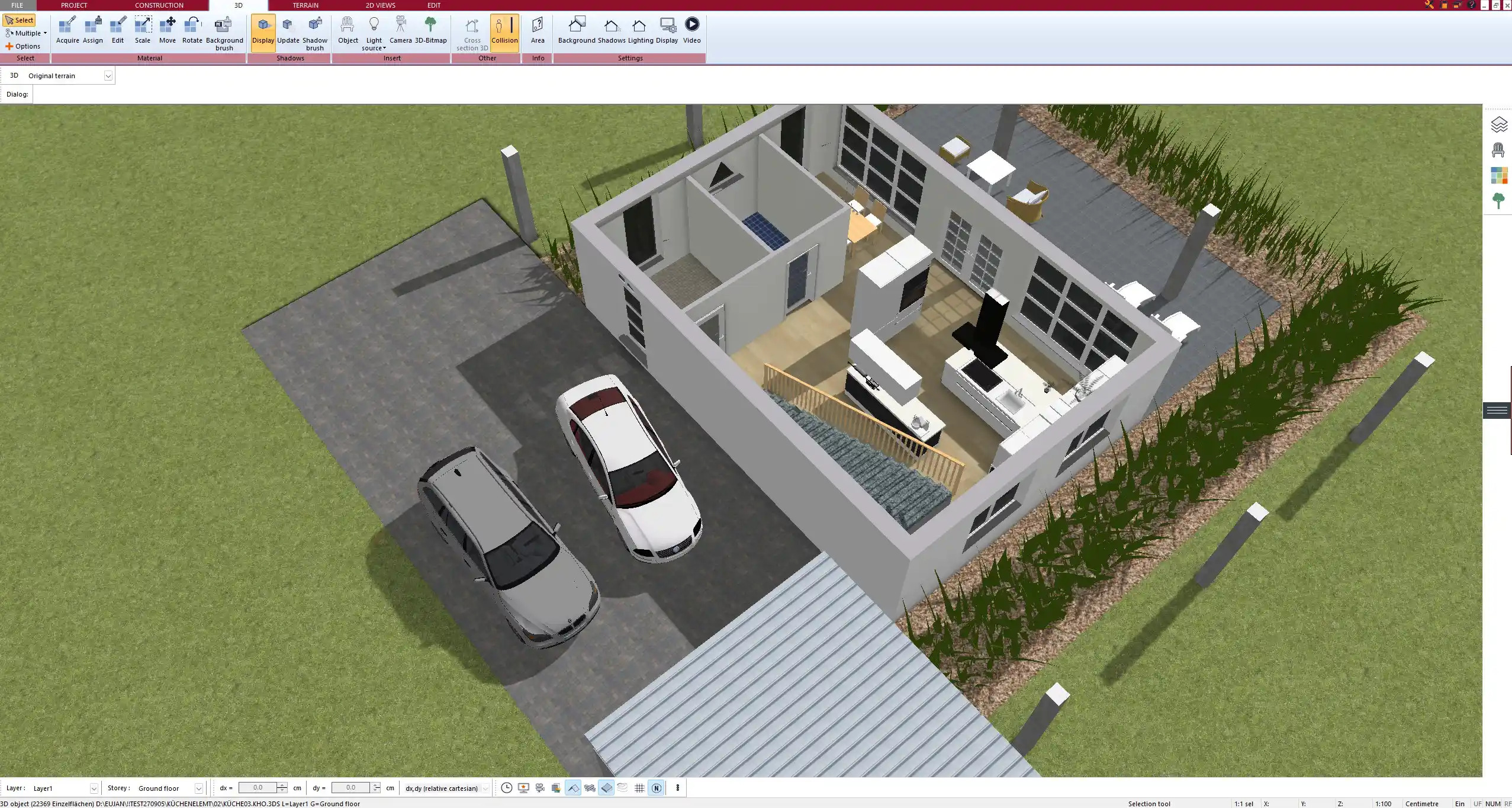
Image Copyright: Plan7Architect
Plan7Architect Pro helps homeowners turn rough home ideas into clear digital floor plans by giving them a practical way to draw the building, define rooms, add dimensions, test layouts in 2D and 3D, and export the result for sharing. Instead of describing a project only with words, sketches or inspiration images, homeowners can create a visual planning document that shows what they actually have in mind.This is especially useful in the early planning phase.
Many homeowners already know what they want in general terms. They want a larger kitchen, a more open living area, an extra bedroom, a better entrance, a garage, a house extension or a completely new home. The difficult part is turning these ideas into a floor plan that can be measured, reviewed and discussed.With Plan7Architect Pro, the planning process becomes more concrete.
You can start with the basic shape of the building, place exterior and interior walls, define rooms, insert doors and windows, add stairs, create roof shapes and view the project as a 3D model. This makes it easier to understand whether the idea works as a real layout.The biggest advantage is that the homeowner can move from imagination to visible planning. A floor plan is no longer just a rough sketch on paper. It becomes a structured project that can be adjusted, improved and shared with others.Typical results homeowners can create include:
- 2D floor plans with rooms, walls, doors and windows
- 3D views of the house or extension
- Dimensions and room labels
- Roof layouts and exterior views
- Sections and elevations
- Plan sheets for printing or sharing
- PDF files for discussion
- DWG and DXF files for CAD workflows
Plan7Architect Pro can also be used with metric and imperial units. This is important because homeowners in different countries plan differently. A user in the United States may prefer feet and inches, while a user in Europe or other regions may prefer meters and centimeters. The software allows the planning environment to match the measurement system used for the project.
Why Homeowners Need More Than a Rough Sketch
A rough sketch is often the first step in a home project. It helps collect ideas quickly and gives the project a basic direction. But once the project becomes more serious, a sketch is usually too limited. It may show the idea, but it often does not show the real size, proportions or practical consequences of the layout.
A sketch can make a room look large enough even when the dimensions would be tight in practice. It can make a hallway look simple, even though it takes away valuable living space. It can show a window in a good-looking position, without considering furniture placement or wall space.
It can show an extension that looks easy to add, without showing how it connects to the existing building.That is why many homeowners reach a point where they need something more accurate. They need a plan that can be changed without redrawing everything from the beginning. They need dimensions. They need a better understanding of room flow. They need a visual model that makes the idea easier to judge.Compared with a rough sketch, a digital plan in Plan7Architect Pro gives homeowners much more control:
- Room sizes are easier to check because the plan can include real dimensions.
- Layout changes are easier because walls, rooms, doors and windows can be adjusted digitally.
- The idea is easier to explain because it can be shown in both 2D and 3D.
- The plan is easier to share because it can be exported as PDF, DWG or DXF.
- Different versions are easier to compare because layout alternatives can be created and adjusted.
- The overall house shape is easier to understand because the project can be viewed as a 3D model.
In practice, this difference matters a lot. A homeowner may believe that the kitchen, living room and dining area will work well together. But after drawing the plan digitally, it may become clear that the kitchen needs more wall space, the dining table blocks a walkway or the living room loses too much usable area because of door positions.A digital floor plan makes these issues visible earlier. That gives the homeowner more control over the project before decisions become more expensive.
Tip: A paper sketch is still useful as a first idea. The practical next step is to rebuild the idea in Plan7Architect Pro, add real dimensions and then check whether the layout still works when the rooms, walls, doors and windows are placed properly.
The Practical Workflow Inside Plan7Architect Pro
Start With the Basic Layout
The first step is to create the basic structure of the project. This usually begins with the outer walls and the main room divisions. At this stage, the plan does not need to be perfect. The goal is to turn the idea into something visible and editable.For a new home, the basic layout may start with the overall building shape. For a renovation, it may begin with recreating the existing rooms. For an extension, the existing building and the new added space need to be planned together.The basic layout usually includes:
- Exterior walls
- Interior walls
- Room divisions
- Main entrances
- Door openings
- Window positions
- Stairs
- Floor levels
- Room names
This step is important because it creates the structure of the entire project. Once the walls and rooms are drawn, the homeowner can immediately see how the space is divided. A living room may look too narrow. A bedroom may need a different wall position. The hallway may take too much space. The kitchen may need a better connection to the dining area.
Plan7Architect Pro is helpful here because changes can be tested directly. A wall can be moved, a room can be resized, a door can be placed differently and a window can be adjusted. This makes the early planning phase much more flexible than working only with paper sketches.
Add Dimensions and Room Details
After the basic layout is created, the next important step is adding dimensions and room details. This is where the plan becomes much more useful for real project discussions.Dimensions help answer practical questions:
- How large is each room?
- How wide is the hallway?
- Where exactly are the doors placed?
- How much wall space is available for furniture?
- Does the kitchen have enough working space?
- Is the bathroom layout realistic?
- Does the garage have enough usable space?
- Does the extension fit the intended size?
Room details also make the plan easier to understand. Labels, furniture, doors, windows and stairs help turn a simple wall layout into a more complete planning document. The homeowner can see how the rooms will actually be used, not only how they are divided.This is especially important when planning spaces that depend heavily on function. Kitchens, bathrooms, utility rooms, garages and staircases need more than just empty room areas.
They need enough space for movement, furniture, fixtures and practical use.In a kitchen, it is useful to check work surfaces, storage areas, island position and walking space. In a bathroom, the shower, bathtub, toilet, vanity and door swing should be considered early. In a living room, seating areas, window positions, the TV wall and circulation space are important. In a bedroom, the bed position, wardrobes and access around furniture should be checked.
In a garage, vehicle space, storage, access doors and the connection to the house often matter more than the basic room size alone.Metric and imperial planning is also useful at this stage. If you are planning for a project in a country that uses feet and inches, you can work in imperial units. If your project is based on meters and centimeters, you can use metric units. This helps keep the plan natural for the country where the building project is located.
Tip: When adding dimensions, it is better to check the important living areas early instead of waiting until the plan looks finished. Kitchens, bathrooms, stairs and garages often reveal layout problems faster than empty rooms.
View the Project in 3D
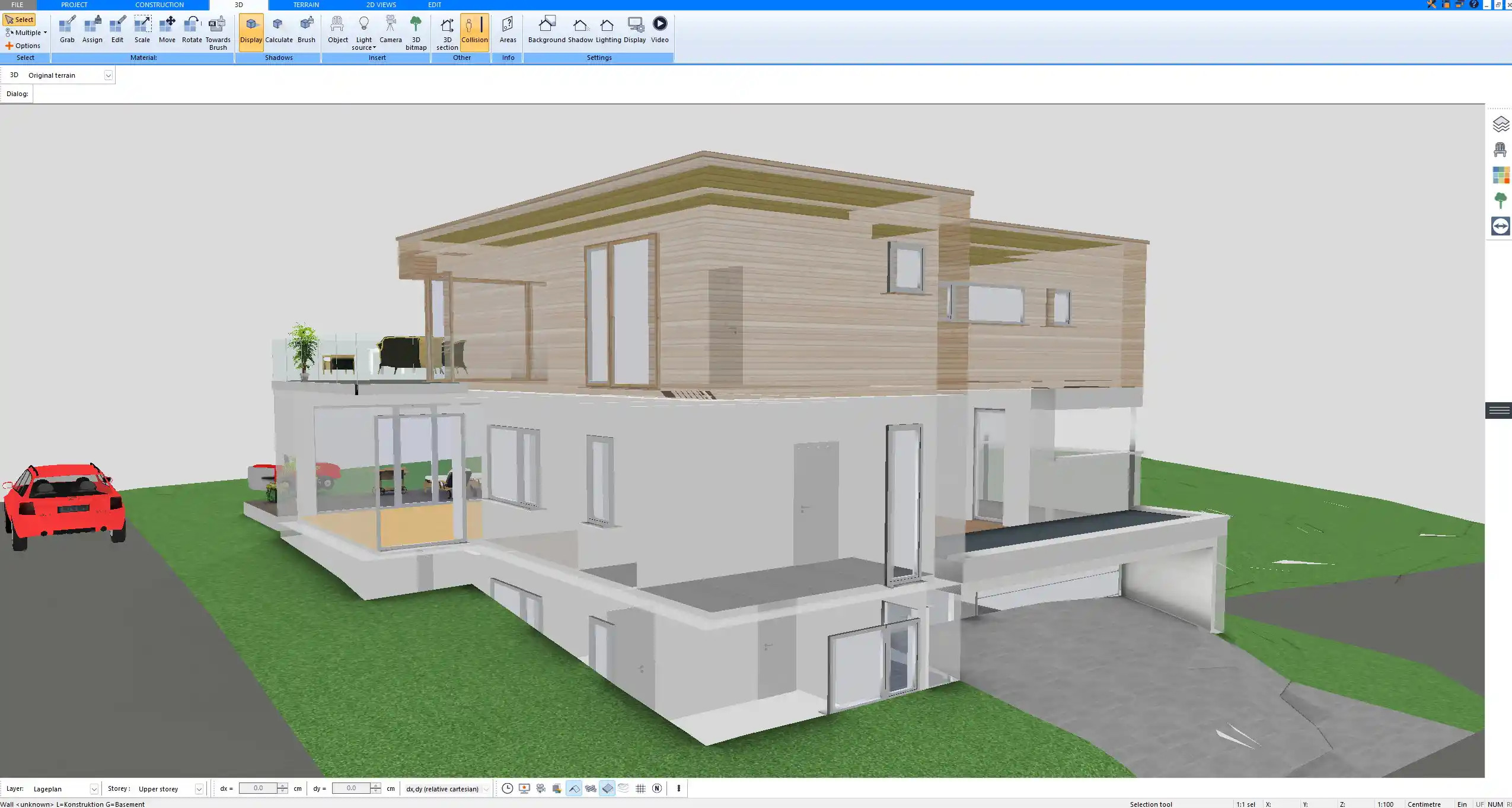
The 3D view is one of the most useful parts of the planning process because it makes the floor plan easier to understand. Many homeowners can read a 2D plan, but they only fully understand the space once they see it in 3D.A 2D floor plan shows the layout from above. It is accurate and important, but it can still feel abstract. The 3D model shows proportions, room volume, roof shape, window placement and the overall character of the building. This helps homeowners judge the project with a much better sense of space.In 3D, it becomes easier to notice things such as:
- A room feeling smaller than expected
- A roof shape changing the look of the house
- Windows sitting too close together
- A living area feeling less open than planned
- An extension looking too large or too small
- A staircase dominating the floor plan
- A facade needing better balance
- A room needing more natural light
This is especially useful for homeowners who are planning a major change, such as an addition, remodel or new house. A project may look good as a flat floor plan but feel different once the walls, roof and exterior shape are visible.The 3D model also makes it easier to explain the project to others. Family members, contractors and designers can often understand a 3D view faster than a technical plan. This makes discussions clearer because everyone can see the same idea.
Export the Plan for Sharing
Once the floor plan is developed, it can be exported and shared. This is one of the reasons why Plan7Architect Pro is useful for homeowners who want to prepare their project before speaking with professionals.PDF export is practical for simple communication.
A PDF can be printed, emailed or opened on many devices. It is useful for showing the current plan to family members, contractors, builders or designers.DWG and DXF exports are useful when the plan should be used in a CAD workflow. These formats are commonly used for technical planning and further editing.The most common export options are useful in different situations:
- PDF is usually the best choice for sharing, printing and discussing the plan.
- DWG is useful when the plan should be opened or edited in a CAD workflow.
- DXF is useful for CAD exchange and technical drawing workflows.
- 3D export formats can be useful for visualization and further presentation work.
- Image files are helpful for quick visual sharing and project overviews.
This makes the digital plan much more useful than a simple sketch. The homeowner can prepare the idea, organize the plan and then share it in a format that fits the next step of the project.
How This Helps Before Talking to Contractors or Architects
One of the strongest benefits of Plan7Architect Pro is that it helps homeowners prepare before they speak with contractors, architects or builders. Instead of explaining the project only with words, they can show a clear plan.This changes the conversation immediately. A homeowner can say where the extension should go, how large the rooms should be, where the windows are planned, what roof shape they are considering and how the interior layout should work.
The plan becomes a visual basis for discussion.This is useful because many misunderstandings in building projects begin with unclear ideas. A homeowner may say “large open kitchen,” but another person may imagine a completely different layout. A homeowner may say “small extension,” but the size may mean something different to each person. A visual plan reduces this uncertainty.A prepared floor plan can help discuss:
- Room sizes
- Wall positions
- Door and window placement
- Extension layout
- Roof ideas
- Floor levels
- Interior flow
- Exterior appearance
- Alternative layouts
- Possible project changes
For homeowners, this preparation often creates more confidence. They can enter the conversation with a better understanding of their own project. They can show what they like, what they have already tested and where they still want professional input.For professionals, the plan can make the early discussion more efficient. Instead of starting with a vague idea, they can react to a visible concept.
They can review the layout, suggest improvements and develop the project further based on a clearer starting point.Tip: Before sending a plan to a contractor or architect, it is useful to prepare one clean version with the main floor plan, key dimensions and a few 3D views. Too many unfinished variants can make the first discussion less focused.
Where Plan7Architect Pro Is Especially Useful
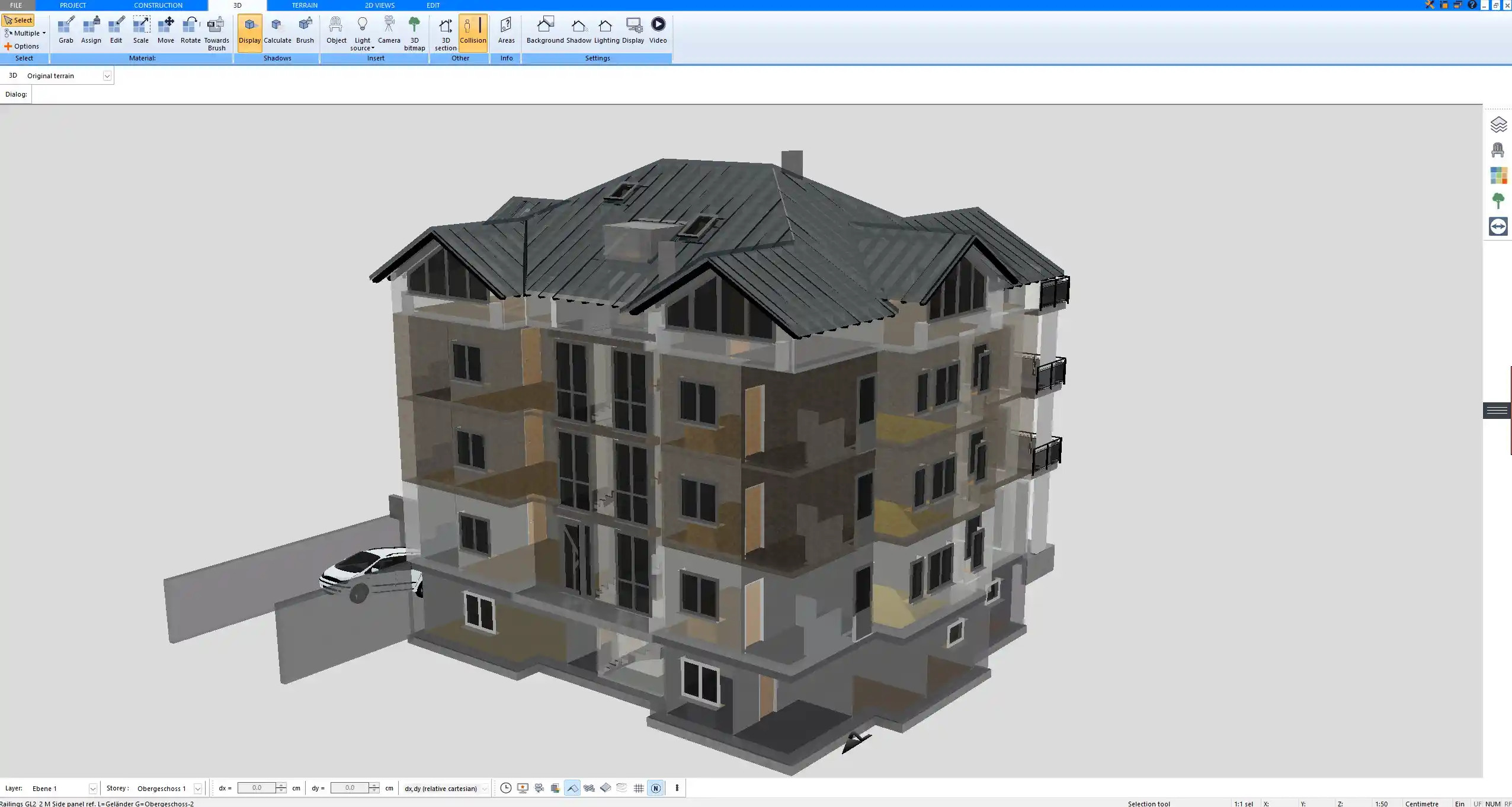
Plan7Architect Pro can be used for many types of residential planning projects. It is especially helpful when the homeowner wants to understand the project visually before moving forward.For a new home, Plan7Architect Pro helps create the full layout, test room sizes and view the house in 3D. Homeowners can plan the relationship between living areas, bedrooms, bathrooms, utility spaces, stairs, entrances and exterior walls before moving into more detailed project discussions.
For a renovation, the software is useful because the existing structure can be recreated and adjusted. This makes it easier to test what happens when rooms are changed, walls are moved or new openings are added.For a remodel, Plan7Architect Pro helps compare different design ideas. A homeowner can test a more open floor plan, a different kitchen layout, a new bathroom arrangement or a better connection between rooms.For an extension, the software helps show how the new space connects to the existing building.
This is important because an extension should not only add space. It should also improve the way the home works.For an addition, the 3D view is especially helpful. It shows whether the added part looks balanced, how the roof shape works and how the new space changes the overall appearance of the home.For a garage, Plan7Architect Pro helps check vehicle space, storage, doors and the connection to the house.
A garage is often used for more than parking, so planning the usable space early is important.For an outbuilding, the software can be used to create a separate structure with its own layout, roof and exterior form.For interior redesign, Plan7Architect Pro helps test furniture placement, room flow, door positions and practical use of space.Typical project types include:
- New homes
- Renovations
- Remodels
- Extensions
- Additions
- Garages
- Outbuildings
- Interior redesigns
- Layout modernization
- Space planning before construction
Why Digital Planning Leads to Better Building Decisions
Digital planning helps homeowners make better decisions because it makes the consequences of each idea visible. A layout decision rarely affects only one room. Moving a staircase can change the hallway, the upper floor and the entrance area.
Enlarging the kitchen may reduce storage or living space. Adding more windows may improve light but reduce furniture placement options.Plan7Architect Pro helps homeowners see these connections earlier. This is valuable because the best floor plan is usually not the first version. It develops through testing, comparing and improving.Common decisions that become easier with digital planning include:
- Whether to choose an open or separated kitchen
- Where to place the staircase
- How large the extension should be
- Whether a room should become an office or guest bedroom
- How much hallway space is acceptable
- Where windows should be placed
- How the roof shape affects the exterior
- Whether the garage should be attached or separate
- How the entrance area should connect to the rest of the home
A digital floor plan also helps homeowners think more realistically about space. Empty rooms often look larger than furnished rooms. A plan becomes more useful when furniture, doors, windows and circulation areas are considered. This makes it easier to avoid layouts that look good at first but feel uncomfortable in daily use.A practical workflow is to create one main plan and then make several variations.
For example, one version may have a larger kitchen, another may include an office, and another may use a different staircase position. Comparing these versions helps homeowners choose based on visible differences rather than guesswork.
How Plan7Architect Pro Makes the Planning Process Easier to Understand
Home planning can become complicated quickly because many decisions are connected. A floor plan is about more than room sizes. It includes movement, light, privacy, furniture, storage, exterior appearance and the relationship between different areas of the home.Plan7Architect Pro makes this easier to understand because the project can be viewed from different angles. The 2D plan shows the structure.
The 3D view shows the spatial impression. Sections and elevations help understand height, roof shape and exterior design. Plan sheets help organize the information for sharing.Each view helps the homeowner understand a different part of the project:
- The 2D floor plan shows the layout, dimensions and room structure.
- The 3D view shows space, proportions and the visual impression of the project.
- Elevations show the exterior appearance and facade balance.
- Sections help explain height, levels and roof relationships.
- Plan sheets help organize the project into a clearer presentation.
- PDF export makes the plan easy to share and print.
- DWG and DXF export support CAD-based continuation of the plan.
This makes the software useful not only for drawing, but for understanding. Homeowners can see how decisions affect the whole project. They can notice problems earlier, explain ideas more clearly and prepare better before the next step in the planning process.


.svg)

.jpg)