
The Van Life Work Setup: Fitting a Dual-Screen System in a Tiny Space

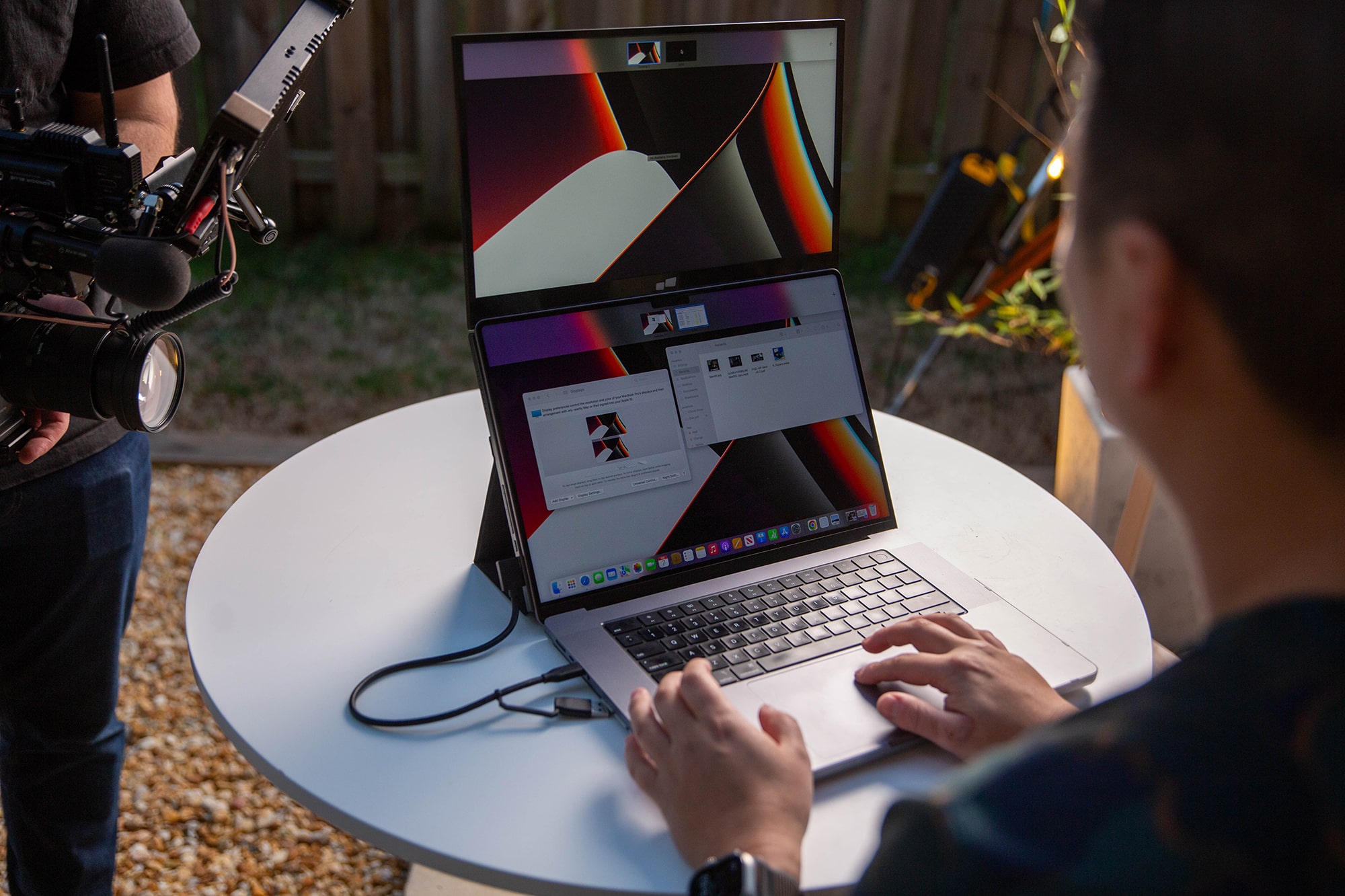
The life of the road provides you with the utmost freedom; however, this freedom comes with a spatial dilemma that one needs to solve. It is very difficult to pack enough space to make use of a proper digital work desk in such a converted camper van. The standard-sized monitor is not at all suitable for life on the road due to its size and fragility.
This problem is solved by using a slimmer and sliding dual-screen device such as Mobile Pixels portable monitor. As it attaches to your laptop lid itself, it offers you an additional screen instantly floating over your small countertop or swivel table.
1. Eliminating Desk Footprint in Tight Layouts
Every square inch of the flat surface inside a camper van counts for something. To install an external monitor, you need a kickstand, which could very well move or tumble down while you park on an uneven spot.
To keep your desk neat and tidy, you need to:
- Go for the screen that will slide out without needing an additional base or kickstand.
- Leverage the magnetic mounting plates to clamp your secondary display to your laptop.
- Pull the monitor out from behind your laptop only once you are done with work
2. Smart Off-Grid Power Management
Van life requires strict monitoring of your electrical system. Running a massive household inverter just to power standard desktop screens wastes an incredible amount of energy through heat conversion loss.
Ensure that you follow these power rules:
- Run your entire workstation using low-voltage DC power options instead of heavy AC appliances.
- Select a secondary monitor that draws its power directly from your laptop battery via a single USB-C cable.
- Keep your electrical draw under 5 watts to prevent draining your house battery bank during long, intensive work sessions.

3. Protecting Gear from Vibrations and Movement
Driving down rough gravel roads or washboard terrain puts an incredible amount of physical stress on electronic equipment. Standard office monitors have weak plastic hinges that can easily snap under constant travel vibrations.
Make sure that you:
- Store your primary working devices in padded, secure storage drawers while the van is in motion.
- Invest in a display made from rugged materials like aluminum alloy and durable plastics that tolerate constant movement.
- Avoid using clumsy desk clamps that can bend or warp your built-in van countertops over time.
4. Why the DUEX is the Ultimate Space-Saver
When your office shares space with your kitchen and your bedroom, minimalism is key. Carrying a heavy monitor setup means adding dead weight that complicates your daily organization.
Look for these specific travel features:
- An ultra-light structure weighing between 1.3 and 1.8 pounds to keep your laptop hinges perfectly safe.
- An incredibly slim profile of only 0.25 inches making it easy to store in a standard laptop sleeve.
- Hybrid signal compatibility that works perfectly with macOS, Windows, and even gaming consoles over a single connection.
Van Life Digital Nomad Gear Comparison Guide
Use this quick reference table to analyze the best layout options for your off-grid mobile office:
Conclusion
Transitioning to an off-grid lifestyle does not mean you have to give up your professional screen real estate. By picking a lightweight, magnetic display that integrates cleanly with your laptop, you can maintain your productivity without sacrificing an inch of your living area. Ready to fully optimize your compact mobile workstation? Check out the Mobile Pixels portable monitor and upgrade your van life setup today.


.svg)

.jpg)